Shared Library Hot Reloading (Part 1)
A long, long time ago, when watching Handmade Hero , somewhere in the first 10-20 or so episodes, Casey shows how to do code hot reloading. That is, having your program running, change your code, recompile and have the application immediately pick up the changes.
Until that time, I always thought it was some voodoo, dark magic that was beyond the comprehension of mere mortals. I was right (somewhat) on the first part, but not on the second. And while I have been using the technique successfully for the longest time, there are still some edge corners that I’ve come to grok better just recently.
The Setup
To better comprehend the technique, it’s important to have a bit of understanding about how shared libraries work and are loaded by the OS. I will use the Windows/DLL nomenclature, but the process is relatively similar on Linux.
When programs are compiled, the code is divided into modules (or libraries). One module will be the
program itself, where the main entrypoint is. But very few programs are complete by themselves. They
require other “external” code for them to function, some provided by third party libraries
(eg. SDL, Boost, etc.) and others come from the OS (ntdll, winapi, etc.).
When a program is being compiled, it has to declare which libraries it needs. This is sometimes referred to as “compiling or linking against” that library, the latter being more correct. Linking to a library can be done statically or dynamically.
Static Linking
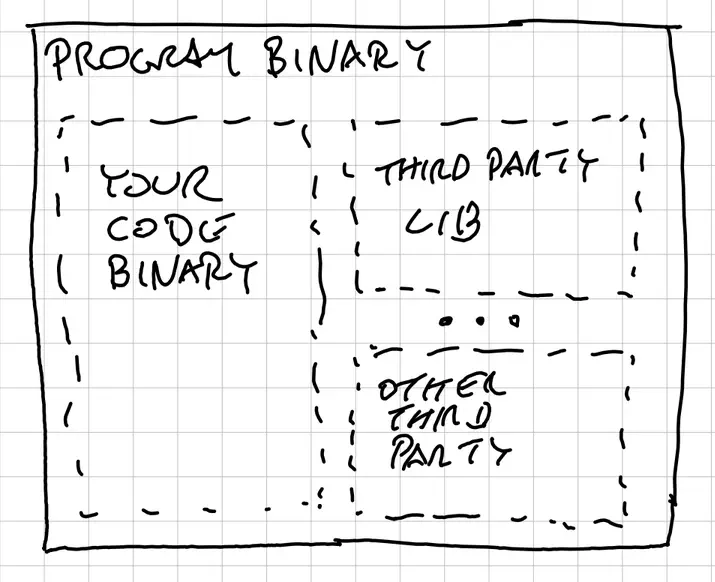
Static linking means that the compiled code of that library will be “bundled in” the main program. Outside from some metadata, from the point of view of the OS, it’s as if that code was written for that program all along. As in, you had the source.
This doesn’t mean that the static library is compiled at the same time as the program, though it often is. Many projects decide to “vendor” the source of their third party libraries and compile them. But you can also download the precompiled libraries. In either way, the compiler needs the headers (so that your code can understand what to call) and either the source or the precompiled library at the moment of compilation, otherwise it cannot “bundle it in”.
Dynamic Linking
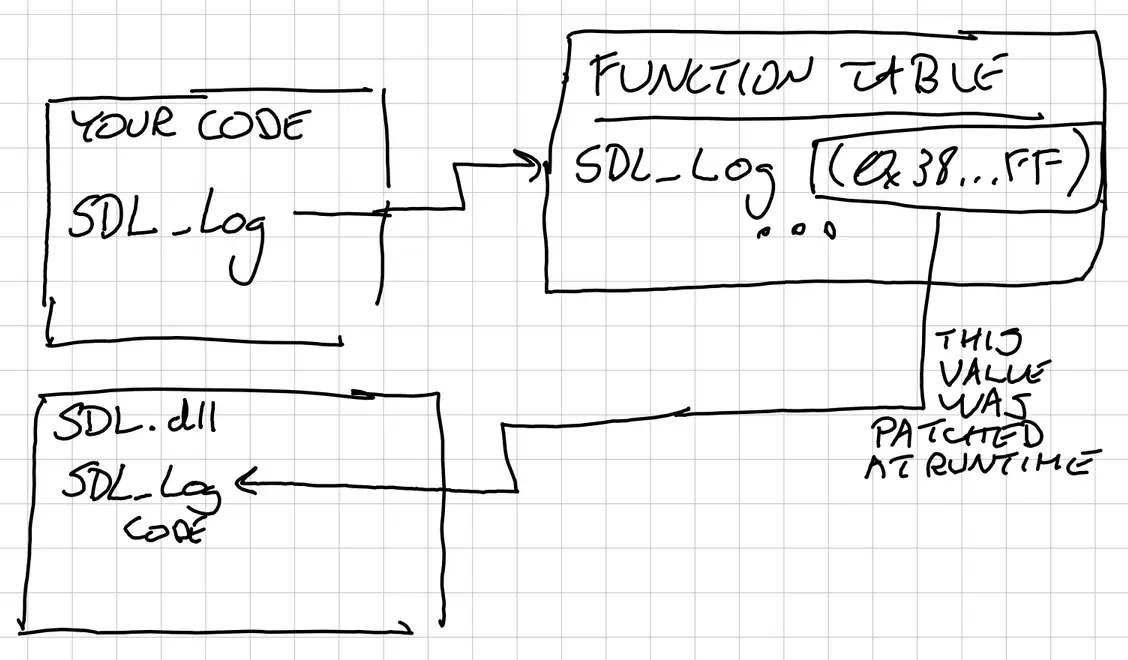
Dynamic linking is different in the sense that instead of bundling the code in, the compiler creates “stubs” for the functions and symbols needed when using the library, and associated metadata to track them. The idea is that this library will be loaded at runtime (dynamically), and the stubs are completed then. At compile time, the compiler needs the headers and some symbol metadata to correctly create the stubs, but it does not need the generated code. Later, at runtime, the OS will find the shared libraries and fill those stubs.
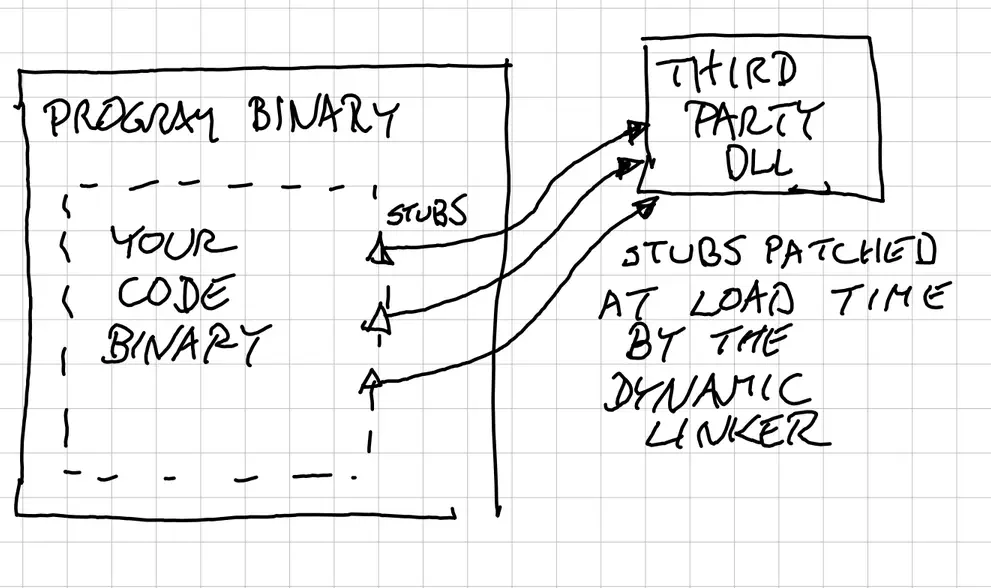
A separate compilation step, which does not happen (and normally isn’t) on the same machine or at the same time, creates the shared library: the actual .dll file. They hold a lot of data, but in a nutshell they are the machine instructions, data pages (precompiled read-only data, like tables, strings, would go in there), plus a lot of metadata.
The most relevant metadata for the dynamic linking, in the case of DLLs, are the Export Directory,
in which there is an Export Address Table. In a nutshell, it is a table that maps function names to
Relative Virtual Addresses. These are fancy names for offsets from a known location, normally what
would be the load address of the shared library. This is needed because the library does not know
where it will be loaded in memory, so the best it can do is to have an offset that can be “patched”
later on.
Static vs Dynamic Linking
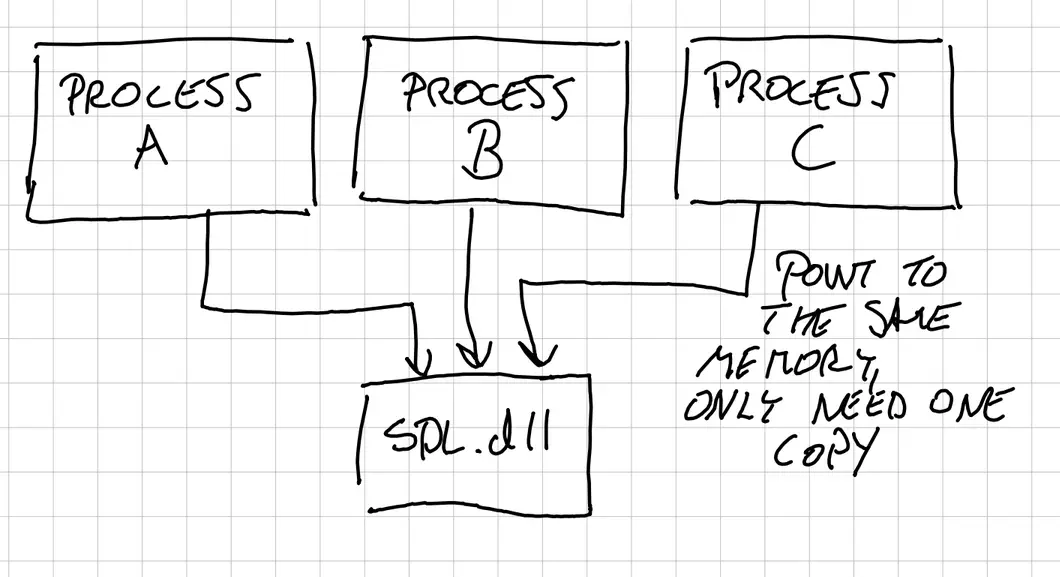
There are pros and cons to each approach. Dynamic linking used to be much more important, because of limited system memory available, meaning that having each process hold copies of libraries was too expensive. But now we have an insane amount of memory available.
Actually in many environments, like cloud computing, they compile everything statically since it’s much less error prone to have one big executable rather than making sure that all the dynamic libraries are correctly deployed. Otherwise you run the risk of a program running well on a machine and then not on another because they have different versions of a shared library.
In practice
Having said the above, OSes use dynamic libraries A LOT. You can see which modules are loaded on a process by using a debugger. As an example, these are the loaded modules for a simple, yet non-trivial program:
Using Windows as an example:
(DLL Name, DLL filepath, Mapped Address Begin, Mapped Address End, Associated PDB file, PDB Load result)
advapi32.dll,C:\Windows\System32\advapi32.dll,7FFC5D0A0000,7FFC5D152000,advapi32.pdb,PdbFail
assimp.dll,C:\Users\crist\_bazel_crist\3m6uftxs\execroot\_main\bazel-out\x64_windows-dbg\bin\kandinsky\assimp.dll,7FFB9BBF0000,7FFB9C40A000,,NoPdb
bcrypt.dll,C:\Windows\System32\bcrypt.dll,7FFC5A370000,7FFC5A396000,bcrypt.pdb,PdbFail
bcryptprimitives.dll,C:\Windows\System32\bcryptprimitives.dll,7FFC5B020000,7FFC5B0B9000,bcryptprimitives.pdb,PdbFail
cfgmgr32.dll,C:\Windows\System32\cfgmgr32.dll,7FFC5A0D0000,7FFC5A127000,cfgmgr32.pdb,PdbFail
clbcatq.dll,C:\Windows\System32\clbcatq.dll,7FFC5C4F0000,7FFC5C598000,CLBCatQ.pdb,PdbFail
combase.dll,C:\Windows\System32\combase.dll,7FFC5BF40000,7FFC5C2C4000,combase.pdb,PdbFail
CoreMessaging.dll,C:\Windows\System32\CoreMessaging.dll,7FFC56C20000,7FFC56D46000,CoreMessaging.pdb,PdbFail
... (<truncated>)
winmm.dll,C:\Windows\System32\winmm.dll,7FFC46830000,7FFC46866000,winmm.pdb,PdbFail
winsta.dll,C:\Windows\System32\winsta.dll,7FFC58BF0000,7FFC58C57000,winsta.pdb,PdbFail
wintrust.dll,C:\Windows\System32\wintrust.dll,7FFC5A490000,7FFC5A510000,wintrust.pdb,PdbFail
WinTypes.dll,C:\Windows\System32\WinTypes.dll,7FFC5A7E0000,7FFC5A954000,WinTypes.pdb,PdbFail
wldp.dll,C:\Windows\System32\wldp.dll,7FFC59C40000,7FFC59C9D000,wldp.pdb,PdbFail
wtsapi32.dll,C:\Windows\System32\wtsapi32.dll,7FFC56F00000,7FFC56F16000,wtsapi32.pdb,PdbFail
Most of them are Windows libraries (note how the debug symbols are not there :sad:). Actually, from all the nonsense, only the following are introduced by me explicitly. All others are injected by Windows:
assimp.dll,C:\Users\crist\_bazel_crist\3m6uftxs\execroot\_main\bazel-out\x64_windows-dbg\bin\kandinsky\assimp.dll,7FFB9BBF0000,7FFB9C40A000,,NoPdb
glew32.dll,C:\Users\crist\_bazel_crist\3m6uftxs\execroot\_main\bazel-out\x64_windows-dbg\bin\kandinsky\glew32.dll,6D610000,6D68B000,C:\Users\Nigel Stewart\Downloads\glew-2.2.0\glew-2.2.0\bin\Release\x64\glew32.pdb,PdbFail
main.exe,C:\Users\crist\_bazel_crist\3m6uftxs\execroot\_main\bazel-out\x64_windows-dbg\bin\kandinsky\main.exe,7FF775820000,7FF776AD4000,C:\users\crist\_bazel_crist\3m6uftxs\execroot\_main\bazel-out\x64_windows-dbg\bin\kandinsky\main.pdb,PdbLoaded
SDL3.dll,C:\Users\crist\_bazel_crist\3m6uftxs\execroot\_main\bazel-out\x64_windows-dbg\bin\kandinsky\SDL3.dll,7FFBFB620000,7FFBFB877000,C:\temp\SDL3-3.2.2\VisualC\SDL\x64\Release\SDL3.pdb,PdbFail
test_251013_190732.0574755.dll,C:\cdc\projects\kandinsky\temp\game_dlls\test_251013_190732.0574755.dll,7FFBF10C0000,7FFBF1359000,C:\users\crist\_bazel_crist\3m6uftxs\execroot\_main\bazel-out\x64_windows-dbg\bin\apps\std\std_shared.pdb,PdbLoaded
Two of them are written by me (main.exe and test_251013_190732.dll), while the others are dependencies.
Program Initialization
OSes, when starting the program, will go through the whole list of dependencies above and load/patch
the dynamic libraries. This is sometimes called the Runtime Linker. When the OS loads a dynamic
library, it roughly goes through the following steps:
Find and read the file into memory.
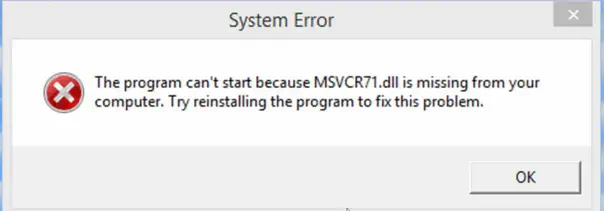
The OS has specific paths and conventions to where to look for these files and in what order. There are mechanisms to instruct the OS where to find them (like
LD_LIBRARY_PATHon Linux).Not finding these dlls will prevent the program from starting. Windows will issue an image like this:
Parse the metadata, headers and all the information needed.
Here it will also do the matching between the symbols imported (needed) by the program and the ones exported by the library. If it cannot, this is where you get the corrupted error. Normally this happens when there is a mismatch of versions (ie. you have an old .dll). On Linux it is very common to have very old system libraries, so maybe your glibc (C runtime) is too old.
Map the code sections into the address space of the process.
These pages will most likely be marked as read-only, executable memory pages. This is where the memory savings come from. Since most programs reuse a lot of system libraries, the OS can load them once into memory and simply map those memory pages into your process, thus having one copy of them in resident memory, regardless of how many processes are running.
Perform the relocations:
This is the “patching” mechanism, since this is the moment the OS knows where in the address space the memory sections are loaded.
Run any initialization code
This is where things like global variables (and constructors in the case of C++) will be initialized.
Doing it manually
The above process is done by the OS on program startup, but there is nothing stopping us from doing the same thing ourselves. Normally OSes will expose functionality to do the same thing. In Windows this is LoadLibrary . That will search for the path, perform (roughly) the same steps as above and return a handle to manage the lifetime of this library.
Once we have the library loaded, we can perform queries into it, again using functionality exposed by the OS. On Windows, the function is GetProcAddress (or SDL_LoadFunction ). This returns the pointer to the function associated with that name. If you know the function signature, you can cast that function pointer and call into the library.
Parting words
There is a whole story here about ABI (Application Binary Interface) . Since we are calling function pointers, we assume that they were compiled with the same convention (aka. we use the same machine registers for arguments, return values, etc.). You cannot simply load a DLL compiled with GCC and expect it to work with a program compiled with MSVC. Even though both are completely valid Windows programs, they do not use registers in the same way, thus the arguments one side uses will not match the expectations of the other.
In the next installment I will explain how to use this knowledge to reliably do “hot code reload”, where a program reloads its code while running, similar to what scripting systems do.